
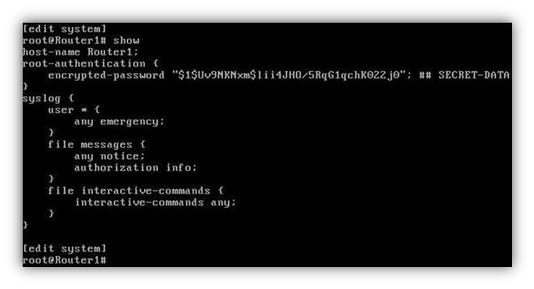
This article is telling about some of the initial configurations of Juniper Routers. Here are the steps that you will experience when you firstly start the Juniper CLI Junos.
1) The first thing you will see is the default user name “Amnesiac” on the screen.
2) After that the “login: “ word will appear and here, FreeBsd wants the initial user name from you.And this user name is “root” at the beginning.
3) But FreeBsd CLI is not the exact point for us. To exit here and enter the Juniper CLI Junos, we will use “cli” command. Here the “>” sign will show that we are in the junos.
4) Now you are in Junos, but in “operational mode”. In here you can monitor and trace the network, but you can not configure anything. For configuration, you must enter the “configuration mode”. To do this use, “configure” command. Here the “#” sign will show that we are in the configuration mode.
5) In configuration mode we can configure everything we want. But here, there is an important point. In Junos for configuration take effect, we must use “commit” command.And to use this command, firstly we must give the Junos a “root password” that is not configured by default. To configure the root password, we must enter the “system configuration” part.


2 Comments
Can I add you to the Linkedin
I just came accross to your web site regard Juniper basic config step by step procedure
Today I just install one Juniper olive on my gns 3 to play around . Ussually I am cisco fan just decided to be open minded to the biggest cisco competotor and why in some circumstances some network engineers likes juniper OS
If want to use less secure plain-text password, can use “set root-authentication plain-text-password”?