
In this article we will focus on static route configuration on Juniper routers. Here, we will use Juniper JuNOS and we will be familiar with some JuNOS commands.
Juniper Static Route Configuration
Example Topology First of all we will give IP addresses to the interfaces. On JUNOS1 Router use the below commands to assign an ip to the interface em0.
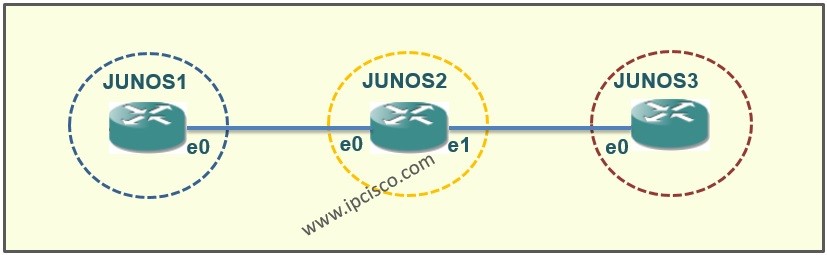
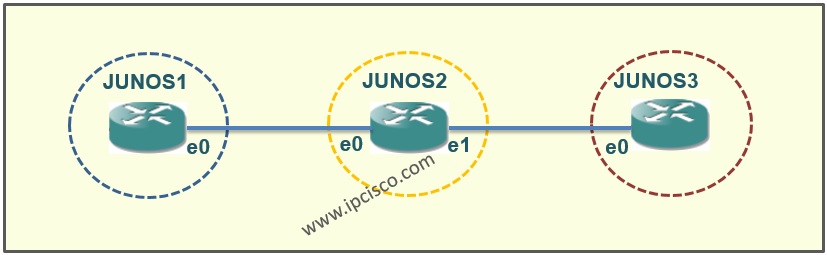
The basic topology that we will use is below. We have three routers and two network. We will provide the route from one network to another.
Example Topology
On JUNOS2 Router you can use the full command in only one line like below. But here we have two interfaces, so we will give to ip addresses that are in different network.
For the last router, JUNOS3 Router use the below commands. Here we can also give ip address to the second interface but there is no device is connected to that interface.

Other Static Routing Lessons on Other Vendors
IPv4 Static Route Configuration on Cisco
IPv6 Static Route Configuration on Cisco
IPv6 Default Route Configuration on Cisco
IPv4 Static Route Configuration on Juniper
IPv6 Static Route Configuration on Juniper
IPv6 Static Route Configuration on Juniper
IPv4 Static Route Configuration on Nokia
IPv4 Default and Floating Route Configuration on Nokia
St Route Configuratioatic Route on Huawei and Load Balancing
IPv4 Default and Floating Route Configuration on Huawei


7 Comments
Good One dear….please share more on juniper
Thank you Krishan…More on Juniper will come with next articles, keep on;)
please share how to upgrade junos IOS
Salam gokhan..whats difference between unit 1 n unit 0?thks
Hi Syareefdol, it is the logical interface name taht you can give numver 0 through 16384. For example there is an interface, ge-0/0/1.0 . Here the “0” after “.” is unit number;)
u didnt upload more, ? plz upload more
Sir,
We have two set routing-options static route but i want to change default next hop i don know what is previous preference, how to change it please help me