AS you know Frame-Relay is a well-known WAN technology that generally used for backbone routers. To understand the basic configuration of Frame-Relay, there is a configuration below with three Cisco 3600 Series Router and one Frame-Relay Switch.
First of all, we will start with Frame-Relay Switch. On GNS3 create a Frame-Relay Switch and right click the Frame-Relay Switch. Configure the DLCI – port mapping like below:
1:101 10:202
1:102 11:203After mapping, connect the routers to the Frame-Relay Switch port mentioned in the mapping via serial connection.
( R1 to port 1, R2 to port 10, R3 to port 11)
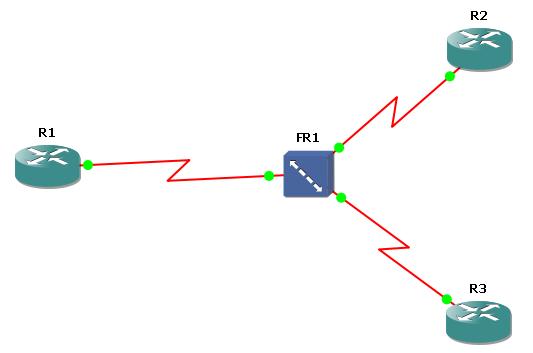
It is time to configure our routers. Starting with the R1 make the below configuration. Here, the Hub Router is R1.
R1 Configuration
R1(config)# no logging console
R1 (config)# int s 0/0
R1 (config-if)# no shut
R1 (config-if)# encapsulation frame-relay
R1 (config-if)# interface s0/0.1 point-to-point
R1 (config-subif)# ip address 192.168.100.1 255.255.255.252
R1 (config-subif)# frame-relay interface-dlci 101
R1 (config-fr-dlci)# exit
R1 (config-subif)# interface s0/0.2 point-to-point
R1 (config-subif)# ip address 192.168.100.5 255.255.255.252
R1 (config-subif)# frame-relay interface-dlci 102
R1 (config-fr-dlci)# exit
R1 (config-subif)# write
Now, configure the R2 for Frame-Relay. Here you can get help from “show frame-relay pvc” command.
R2 Configuration
R2 (config)# no logging console
R2 (config)# int s 0/0
R2 (config-if)# no shut
R2 (config-if)# encapsulation frame-relay
R2 (config-if)# interface serial 0/0.1 point-to-point
R2 (config-subif)# ip address 192.168.100.2 255.255.255.252
You can reach the other Frame-Relay articles below:
Basic Frame-Relay Configuration with both Inverse-ARP and Frame-Relay Map Command
Basic Point-to-Point Frame-Relay Configuration
Basic Multipoint Frame-Relay Configuration




7 Comments
Thanks Kosem,
It really help me to create my Lab
wishes
mayukh
You are welcome mayukh ;) I hope this website will help you more in the future…
suppose we want to connect r2 to r3 then what we should do sir.
Asking questions are genuinely nice thing if you are not understanding something completely,
except this article gives nice understanding even.
Could you please post the
“Point to Point” configuration of FRAME_RELAY SWTICh
and “Point to Multipoint”
Thanks.
To begin with I want to say fantastic blog!
I had a fast question by which I’d prefer to ask should you don’t mind.
I used to be interested to learn the method that you
center yourself and clear your thinking before writing.
I’ve had difficulty clearing my thoughts in getting
my ideas around. I actually do enjoy writing nevertheless
it just looks like the first ten to fifteen minutes are often wasted just
trying to figure out how to begin. Any recommendations or hints?
Many thanks!
Thanks kosem , very helpful