
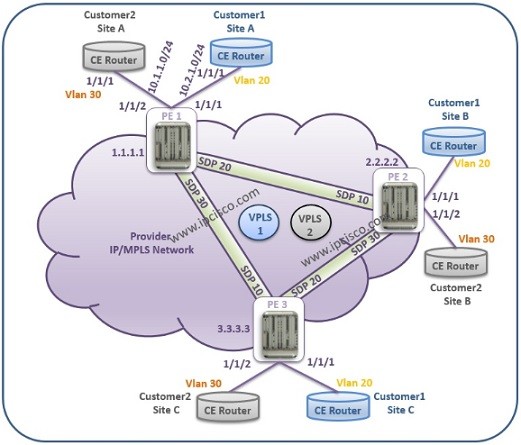
In this lesson, we will configure VPLS on Nokia Service Routers. Before any Service configuration, our IGP configuration must be done and the network must be converged. We had talked about this preparations in the previous articles. In this article, we will focus on VPLS configuration. We assume that, our IGP configuration is done and the network converged without any problem. You can also check Cisco VPLS Configuration lesson.
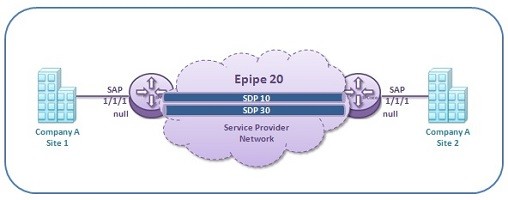
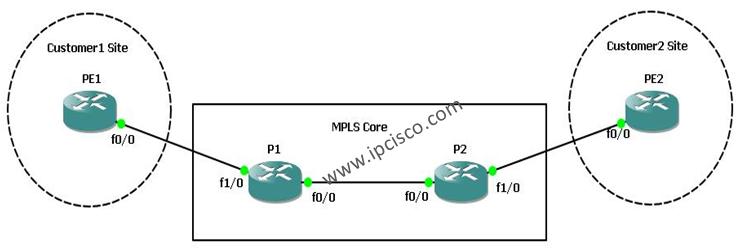
Our example topology will be like below:
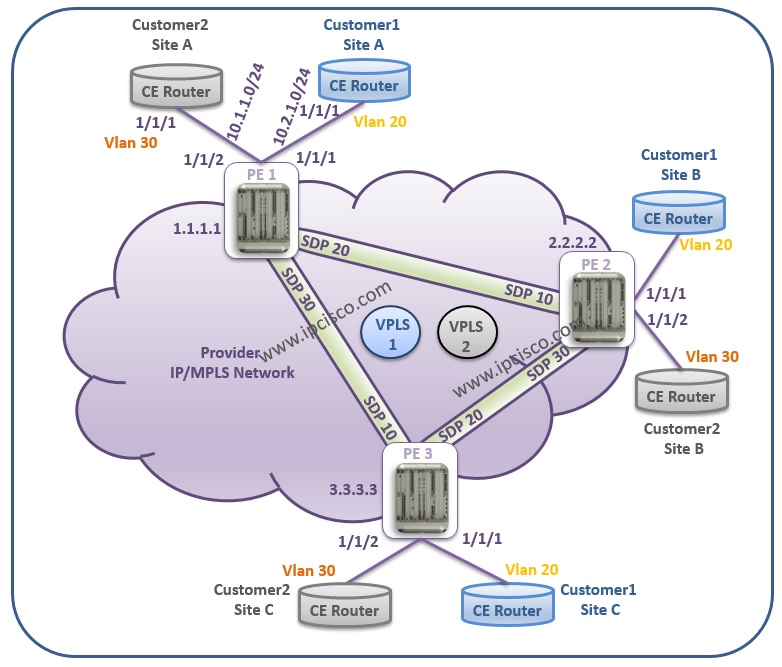
Table of Contents
SDP Configuration on PE Routers
PE1# configure service
PE1# config>service# sdp 20 mpls create
PE1# config>service>sdp$ far-end 2.2.2.2
PE1# config>service>sdp$ lsp “to_routerPE2”
PE1# config>service>sdp$ no shutdown
PE1# config>service>sdp# exit
PE1# config>service# sdp 30 mpls create
PE1# config>service>sdp$ far-end 3.3.3.3
PE1# config>service>sdp$ lsp “to_routerPE3”
PE1# config>service>sdp$ no shutdown
PE1# config>service>sdp$ exit
For bidirectional traffic, the remote side of this SDPs must be configured also. Remember, SDP is unidirectional. One more recall is, SDPs use remote system address as far-end.
PE2# configure service
PE2# config>service# sdp 10 mpls create
PE2# config>service>sdp$ far-end 1.1.1.1
PE2# config>service>sdp$ lsp “to_routerPE1”
PE2# config>service>sdp$ no shutdown
PE2# config>service>sdp$ exit
PE2# config>service# sdp 30 mpls create
PE2# config>service>sdp$ far-end 3.3.3.3
PE2# config>service>sdp$ lsp “to_routerPE3”
PE2# config>service>sdp$ no shutdown
PE2# config>service>sdp>exit
PE3# configure service
PE3# config>service# sdp 10 mpls create
PE3# config>service>sdp$ far-end 1.1.1.1
PE3# config>service>sdp$ lsp “to_routerPE1”
PE3# config>service>sdp$ no shutdown
PE3# config>service>sdp>exit
PE3# config>service# sdp 20 mpls create
PE3# config>service>sdp$ far-end 2.2.2.2
PE3# config>service>sdp$ lsp “to_routerPE2”
PE3# config>service>sdp$ no shutdown
PE3# config>service>sdp>exit
Let’s start to configure VPLS, according to the example topology.
Service Configuration Steps on PE Routers
1.Create Customer.
PE1# configure service
PE1>config>service# customer 100 create
PE1>config>service>cust$ description “Our VPLS Customer 1”
PE1>config>service>cust# exit
PE1>config>service# customer 200 create
PE1>config>service>cust$ description “Our VPLS Customer 2”
PE1>config>service>cust# exit all
2.Create VPLS Service associated with Customer ID.
PE1# configure service vpls 110 customer 100 create
PE1>config>service>vpls$ description “VPLS Service of Customer 100”
PE1>config>service>vpls$ exit all
PE1# configure service vpls 120 customer 200 create
PE1>config>service>vpls$ description “VPLS Service of Customer 200”
PE1>config>service>vpls$ exit all
3.Bind SDPs to the VPLS Service.
Here we will bind our predefined SDPs to the services. For each service, we need to reach each customer site. So we will use the predefined two SDPs.


8 Comments
Hello,
Thank you for your explanations. It is clear and very helpful.
I just want to get your attention to the customer edge configuration. I am afraid you switched the IP addresses between the two CEs in you example.
Thank you very much Safaa. You are right. Good luck.
very interesting thanks a lot.
Greta one Gokhan. I remember I was configuring the same on ALU7450-ESS1/7 back in 2005. I still love the way ALU OS works; highly logical and easily understood.
Thanks Gokhan!
Its very Useful for ALU engineers.
HI friend,
Good article.
Do you have the list of configurations that are to be followed while using BGP based auto discovery type of VPLS.
Hi Mukund. More BGP lesson will be added. We will think about it. Good luck!
can u share how to create LSP service for one Customer .. Thanks :p